What Is Duolingo Focus Mode? How It Works, Lessons
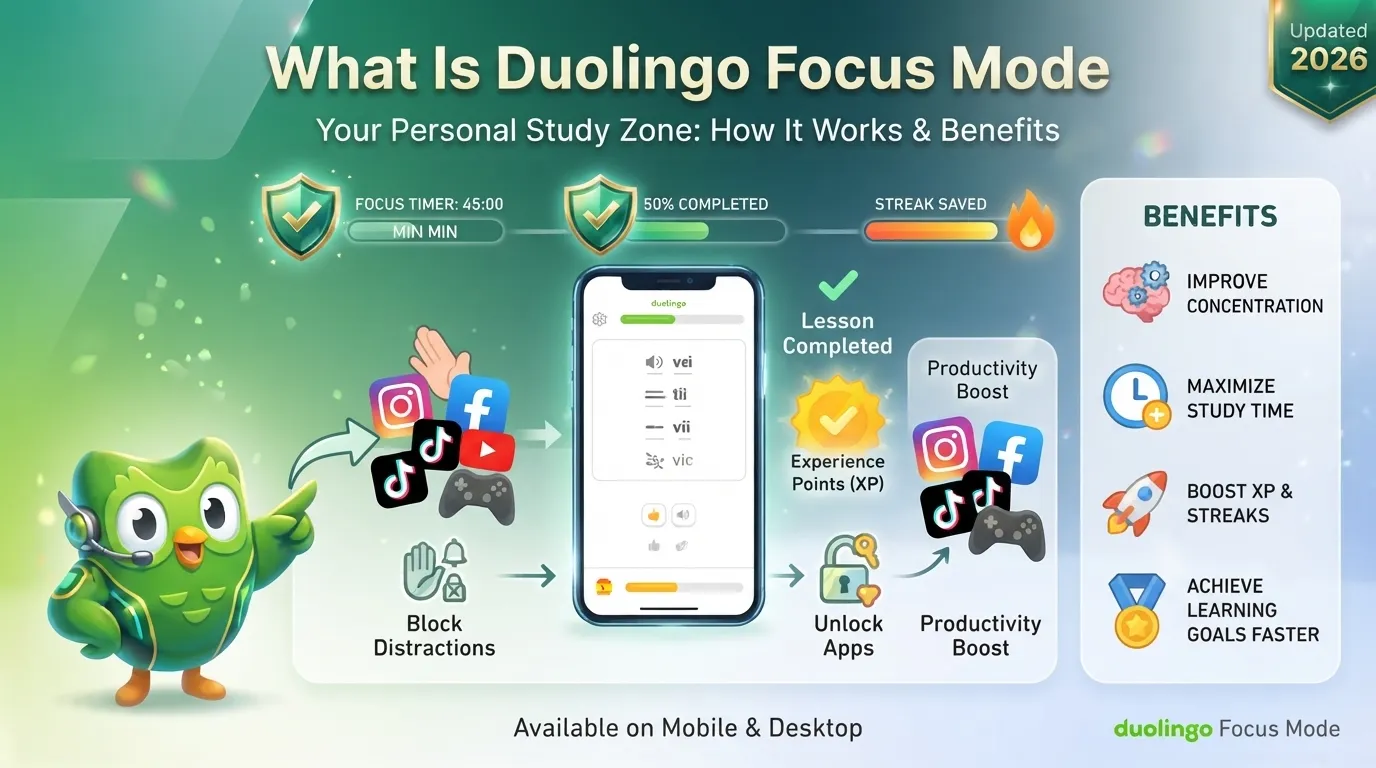
Duolingo Focus Mode is a productivity feature designed to help you stay inside your language-learning session instead of getting pulled into distracting apps. The basic idea is simple: you choose apps you want to restrict, set a lesson goal, and those apps remain blocked until you complete the required Duolingo lessons.
Instead of asking you to spend a fixed amount of time studying, Focus Mode connects access to other apps with an actual learning activity. For example, you might decide that TikTok and Instagram should stay unavailable until you finish two Duolingo lessons.
That makes Focus Mode different from traditional screen-time tools. The restriction is linked to what you accomplish in Duolingo rather than simply how many minutes you have spent studying.
For people who frequently open social media while learning, this can turn a phone from a source of distraction into part of the study routine.
How Does Duolingo Focus Mode Work?
The feature is designed around a straightforward sequence.
First, you enable Focus Mode in Duolingo and provide the required device permissions. You can then choose the apps or categories you want to restrict and select your daily lesson target.
The reported lesson choices are 1, 2, or 3 lessons.
Once Focus Mode is active, selected apps can appear greyed out or restricted. If you try to open one before completing your target, the device shows that you need to finish the required Duolingo activity first.
After you complete the selected number of lessons, the restriction can be removed and the blocked apps become available again.
The important point is that the trigger is lesson completion, not simply the passage of time.
A Simple Example
Imagine you are learning Spanish and constantly checking Instagram during your lessons.
You could set Focus Mode to:
- Block Instagram and TikTok
- Require 2 Duolingo lessons
- Start your study session
- Complete the lessons
- Regain access to the selected apps
This creates a small commitment that is easier to understand than an abstract goal such as “study for 30 minutes.”
Why Was Duolingo Focus Mode Created?
Focus Mode addresses a very common problem with mobile learning: the same phone that contains your language course also contains endless distractions.
A Duolingo notification may bring you into the app, but another notification can quickly take you somewhere else. One quick check of social media can become a much longer interruption.
One productivity-focused account described a particularly familiar pattern: a learner intended to study, checked TikTok, watched 47 videos, and lost around 30 minutes.
The problem isn’t necessarily a lack of interest in learning. Sometimes the environment makes concentration difficult.
Focus Mode attempts to change that environment instead of asking users to depend entirely on willpower.
Focus Mode and the Psychology of Distraction
There are several reasons staying focused on language learning can be difficult.
Immediate Rewards Can Beat Long-Term Rewards
Social media platforms provide instant novelty through notifications, videos, likes, and new posts. Learning a language usually works differently. Progress comes through repetition, practice, mistakes, and gradual improvement.
That difference can make a quick social-media check feel more attractive than another vocabulary exercise.
Context Switching Can Break Your Momentum
Switching from a language lesson to another app isn’t always a harmless few seconds. Once your attention moves somewhere else, getting back into the original task can take time.
One productivity article cited 23 minutes as an average refocusing figure after distraction. The exact time varies considerably from person to person, but the broader lesson is useful: interruptions can carry a hidden concentration cost.
Small Goals Can Make Starting Easier
Focus Mode’s 1–3 lesson structure also fits a simple behavioral principle: a smaller starting commitment can feel easier than telling yourself to study for an hour.
Instead of thinking, “I need to study Spanish for 60 minutes,” the immediate task becomes, “I need to complete one lesson.”
That can make getting started less intimidating.
What Apps Can Duolingo Focus Mode Block?
The feature is designed around apps that compete for your attention.
Depending on the device and configuration, examples discussed around Focus Mode include:
- TikTok
- YouTube
- Twitter/X
- Other selected distracting apps or categories
The important feature is that users can choose what they want to restrict rather than having every application on their phone automatically blocked.
This makes the experience more flexible. Someone who needs WhatsApp for work, for example, may want to restrict entertainment apps while leaving essential communication available.
How Many Duolingo Lessons Do You Need to Complete?
The reported Focus Mode configuration includes 1, 2, or 3 lessons as the daily target.
That number matters because it makes the feature different from a conventional timer.
A normal screen-time restriction might say:
You have 30 minutes of Instagram left.
Focus Mode instead works around an activity:
Complete your required Duolingo lessons before the selected distraction becomes available again.
This activity-based approach is one of the most interesting parts of the feature.
Duolingo Focus Mode vs Screen Time
Apple Screen Time and Android Digital Wellbeing already provide tools for controlling app usage. So why would someone need another focus feature?
The main distinction is how the restriction is triggered.
Traditional screen-time systems generally work around time limits. You can restrict an app after a certain amount of usage, for example.
Focus Mode takes a different approach by connecting the restriction to learning progress.
You complete the required Duolingo activity, and that becomes the condition for unlocking the selected apps.
This creates a direct relationship between distraction and productivity: finish the learning task first, then return to the distraction.
How Does Focus Mode Use Apple’s Technology?
The reported iOS implementation is built around Apple’s Screen Time-related frameworks.
Three important technical components are associated with the implementation:
FamilyControls
FamilyControls is used for authorization and lets the user give the application permission to manage selected restrictions.
ManagedSettings
ManagedSettings is responsible for applying restrictions and shielding selected applications.
DeviceActivity
DeviceActivity helps with scheduling and monitoring activity-related conditions.
Together, these components allow an application such as Duolingo to work with Apple’s device-level controls without simply creating its own independent app-blocking system.
Privacy is also important here. Apple’s framework is designed to limit what applications can directly access about the user’s selected apps, including the use of privacy-preserving tokens rather than simply exposing readable application names.
Is Duolingo Focus Mode Available on iPhone?
Availability has been evolving throughout 2026, so users should be careful with older descriptions of the feature.
Reports during March–May 2026 described testing and phased development, while coverage around early July 2026 continued to describe availability as limited rather than universal.
The feature has primarily been discussed in connection with iOS.
That means seeing information about Focus Mode does not necessarily mean every Duolingo account or every iPhone can use it immediately. Availability can depend on the rollout, app version, account, and region.
Is Duolingo Focus Mode Available on Android?
Android availability has been less clear.
Some reporting has described an Android counterpart as being in development and potentially arriving later in 2026, while other coverage has been more cautious and treats Android availability as unconfirmed.
Because of that difference, Android users should not assume that the iOS implementation is already available on their device.
The safest approach is to check the latest Duolingo app version and the Focus Mode option inside the app rather than relying on an older article or announcement.
Is Duolingo Focus Mode Free?
The feature has been described as available to both free and paid Duolingo users.
However, availability and feature access can change during a phased rollout. If Focus Mode does not appear in your account, that does not necessarily mean you need a paid subscription.
Check the current version of the Duolingo app and your account’s available features.
Can You Override Duolingo Focus Mode?
Focus Mode is intended to reduce distractions, but it is not necessarily an irreversible lock.
Reports describe an override option that allows a user to deliberately break the focus session.
This is important for real-world situations. A completely inflexible system could become frustrating if you suddenly need to access a blocked application for something important.
The override also creates an interesting psychological balance: the feature creates friction around distraction without taking complete control away from the user.
Does Focus Mode Actually Help You Learn?
Focus Mode can make concentrating easier, but it cannot guarantee better language learning.
Its value comes from removing one of the biggest obstacles to studying on a smartphone: easy access to competing entertainment.
One reported 30-day personal test using a distraction-blocking tool alongside Duolingo recorded:
- Focus time increasing from 12 minutes to 41 minutes
- Phone pickups decreasing from 47 to 3 per hour
- Lessons increasing from 8 to 23 per week
- Test period: 30 days
These figures are an individual’s reported results, not a controlled scientific study. They should therefore be treated as an example rather than proof that every Duolingo user will experience the same improvement.
Still, they illustrate why reducing interruptions can matter.
Focus Mode Is Not a Replacement for Good Study Habits
Blocking TikTok won’t automatically make a language learner effective.
You still need to practice vocabulary, listening, pronunciation, reading, and real-world communication. Duolingo can support consistent practice, but concentration tools work best when combined with a realistic learning routine.
A simple approach is often enough:
- Start with one lesson.
- Remove your biggest distraction.
- Finish the lesson before opening entertainment apps.
- Repeat the routine consistently.
- Increase your workload only when the smaller routine feels comfortable.
The goal isn’t to make every study session intense. The goal is to make starting and continuing easier.
Focus Mode and the Duolingo Streak Problem
One interesting product-design issue is the difference between maintaining a streak and actually learning.
A learner could theoretically open Duolingo late at night, complete the minimum activity needed to preserve a streak, and remember very little afterward.
One personal example described a Duolingo streak lasting approximately 14 months, with around 200 evenings involving late-night sessions. The learner sometimes opened Duolingo around 11:40 PM, completed the minimum lessons, and even did so while watching Netflix.
The streak survived, but meaningful learning was not necessarily happening.
This highlights an important distinction:
A streak measures consistency of activity. It does not automatically measure quality of learning.
Focus Mode attempts to improve the environment around that activity by making it harder to immediately switch to another distraction.
Why Activity-Based Unlocking Is Different
The strongest idea behind Focus Mode is not simply “block apps.”
Many phones already do that.
The more interesting idea is:
Complete something valuable before getting access to something distracting.
That changes the psychological relationship between the two activities.
Instead of saying:
“Don’t use TikTok.”
the system effectively encourages:
“Finish your language practice first.”
That small change can make the restriction feel more purposeful.
What Are the Possible Downsides?
Focus Mode isn’t perfect for everyone.
A restriction can become frustrating when you genuinely need an app that has been blocked. An override helps, but repeatedly overriding the feature can reduce its usefulness.
There are also broader considerations around device compatibility, battery behavior, permissions, and the way users respond psychologically to app restrictions.
The best setup is therefore not necessarily the strictest one.
If blocking ten apps makes you frustrated, start by blocking the one or two apps that cause the most distraction.
Is Duolingo Focus Mode Worth Using?
For learners who regularly leave Duolingo to check social media, Focus Mode can be worth trying.
It is especially useful if your biggest problem isn’t knowing what to study but staying with the lesson once you start.
The feature is less important for someone who already puts their phone away, uses a dedicated study device, or has strong control over app distractions.
A practical way to evaluate it is to use Focus Mode for a week and observe three things:
- How often you leave Duolingo during a lesson
- How many lessons you actually complete
- Whether you feel less distracted while studying
If those numbers and your experience improve, the feature is doing its job.
FAQs
What is Duolingo Focus Mode?
Duolingo Focus Mode is a distraction-control feature that can restrict selected phone apps until you complete a required number of Duolingo lessons.
How many lessons does Focus Mode require?
The reported configuration offers 1, 2, or 3 lessons as the target.
What happens when a blocked app is opened?
The selected app can appear restricted or greyed out, with the user being prompted to complete the required Duolingo activity before normal access is restored.
Can I choose which apps are blocked?
The feature is designed to let users select the apps or categories they want to restrict.
Is Focus Mode available on Android?
Android availability has been less certain than iOS. Some reports describe an Android version as being developed for later in 2026, so users should check their current Duolingo app rather than assuming it is available.
Does Focus Mode replace Apple Screen Time?
No. Focus Mode works alongside device-level controls rather than making Apple’s Screen Time unnecessary. Its key difference is that it connects app access to a learning activity instead of relying only on time limits.
Can Focus Mode be overridden?
Reports describe an override option, allowing users to deliberately end or bypass a focus restriction when necessary.
Is Focus Mode useful for maintaining a Duolingo routine?
It can be useful when phone distractions repeatedly interrupt your lessons. However, consistency alone does not guarantee effective learning. The quality of your practice still matters.
Final Takeaway
Duolingo Focus Mode is an interesting shift from traditional screen-time management because it connects access to distractions with completion of a learning task.
Instead of simply telling you to spend less time on TikTok or Instagram, the idea is to finish your Duolingo lesson first. With reported targets of 1–3 lessons, selected-app blocking, iOS Screen Time technology, and an override option, the feature is designed to add just enough friction to keep your attention where you want it.
Its biggest strength is also its simplicity: learn first, scroll later.
For users who already struggle with phone distractions, that small change can make a regular language-learning session feel much easier to start—and much harder to abandon.

I’m a website professional with 5 years of experience in building, managing, and growing online content platforms. As the creator of DuolingoGuides.us, I focus on providing helpful, easy-to-understand guides and resources for Duolingo users and language learners. My goal is to make information simple, accurate, and accessible for everyone.