How To Restart Duolingo: Step-by-Step Guide
Restarting Duolingo is possible, but the exact method depends on whether you want to remove one language, reset progress, or begin with a new account. The safest route is usually to reset a specific course on the web, because Duolingo’s reset/remove feature is web-only and can permanently erase that course’s progress.
Introduction
Many learners get stuck in Duolingo after joining at the wrong level, losing momentum, or wanting a cleaner start. That frustration is normal, especially if lessons feel too easy, too hard, or disconnected from your current skill level. The good news is that Duolingo offers ways to restart, and you can choose the method that fits your goal best.
Why You Might Want To Restart Duolingo
A restart makes sense when the course level no longer matches your ability. Some people begin too high and miss basic grammar, while others return after a long break and forget most of what they learned. A fresh start can also help when motivation drops and you want a simpler, more organized learning path.
Before You Restart
The biggest risk is progress loss: once a course is reset or removed, the old progress is gone. Duolingo’s reset/remove feature is available only on the web, so you may need a desktop or browser to finish the job. In many cases, your broader account stays intact, but the language course itself is affected, so review the warning carefully before confirming anything.
Method 1 – Remove a Course
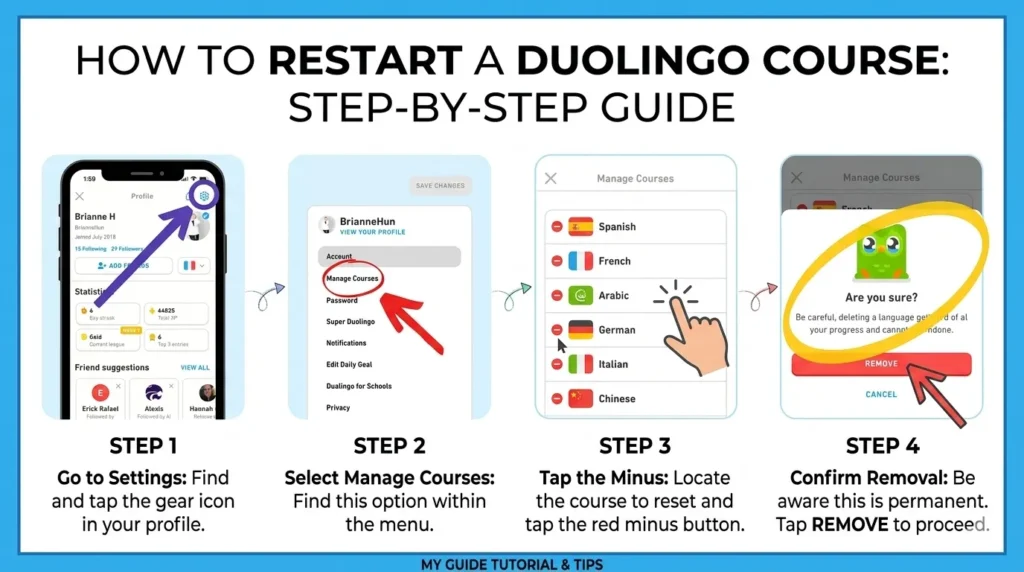
Use this if you want to restart one language from scratch. On the Duolingo website, go to your settings, open course management, and choose the language you want to remove or reset; Duolingo shows a confirmation step before deleting that progress. After removal, you can add the language back and start again.
Steps:
- Sign in to Duolingo on the web.
- Open Settings.
- Find Manage courses.
- Select the language to reset or remove.
- Confirm the warning and proceed.
- Add the language back if you want to begin again.
Warning: this action can permanently destroy the language progress tied to that course.
Result: the course is cleared, and you can restart the language from the beginning or choose a placement option if offered.
Method 2 – Reset Progress Completely
This method is for learners who want the cleanest possible restart for a language course. Duolingo’s wiki notes that resetting a course is basically the same as removing it and adding nothing back immediately, and it also confirms that the feature is web-only. Use this when the current level is far from your real skill or when you want to rebuild from the first lesson.
Steps:
- Open Duolingo in a browser.
- Go to the course management or reset page.
- Select the language.
- Choose Reset Progress if shown.
- Confirm the deletion.
When to use it: choose this if your placement is completely wrong, you want to redo the basics, or you want to rebuild habits from zero.
Method 3 – Start Fresh With New Account
A new account is the most extreme option, because it gives you a brand-new learning history. The benefit is a totally clean dashboard, but the downside is that you lose your old streak, achievements, and any subscription-related convenience tied to the original account. This is usually only worth it if you want a completely separate learning identity.
Pros:
- Full reset feeling.
- No old course clutter.
- Easier if you want a totally new routine.
Cons:
- You lose account history.
- You may lose streak continuity.
- It is usually unnecessary if you only need one language reset.
What Happens After You Restart
After a restart, XP history for that course is generally tied to the removed progress, so the language starts over. Duolingo’s warnings indicate that course progress is deleted, and the process is meant to be final once confirmed. Achievements linked to that course may also no longer reflect your previous path, so restart only when you are sure.
How To Restart Without Losing Your Streak
The safest workaround is to avoid resetting during an active streak day unless you are prepared to accept possible changes to your course progress. If your goal is only to relearn basics, consider slowing down, using review exercises, or changing your study plan before deleting the language. That way, you keep your daily habit while still refreshing your skills.
Common Problems & Fixes
If you do not see the reset option, check the web version first, because the feature is available only on the web. If you are using the app, switch to a browser and sign in there instead. A second common issue is confusion between removing a course and deleting an account; those are not the same, and course reset is much less drastic than account deletion.
Better Alternative Than Restarting
If you only feel rusty, a full reset may be unnecessary. Duolingo’s placement or test-out style options can help you move faster without losing everything, and review-style practice can rebuild weak areas more gently. This is often better for learners who already know the basics but want more confidence.
Final Thoughts
Restarting Duolingo can help if your current course no longer matches your level or motivation. The key is to use the web-based reset carefully, because the change can permanently remove course progress. A restart works best when you have a clear reason and a simple plan for what to study next.
FAQs
Can I restart learning a language on Duolingo?
Yes, you can restart by removing or resetting the course on the web and then adding the language back.
How do I reset Duolingo to start from the beginning?
Open Duolingo on the web, go to settings, find course management, and reset or remove the language.
How to reset Duo progress?
Use the web settings page and choose the course reset/remove option for that language.
How to refresh Duolingo language?
The easiest way is to reset the course, or use review and placement tools if you do not want a full wipe.
How do I restart Duolingo?
Sign in on the web, go to settings, manage your courses, and reset the language you want to restart.
Does restarting a language affect Duolingo?
Yes, it affects that language’s progress and can permanently delete it, but the account itself usually remains.
Should I reset a Duolingo course?
Reset it only if the level is wrong, you lost track, or you truly want a fresh start.
How do I reset my Duolingo account?
Duolingo’s course reset is not the same as deleting an account; account-level changes are different and more drastic.
Conclusion
Restarting Duolingo is useful when your language level, motivation, or study path needs a clean reset. For most users in the U.S., the best approach is to use the web version, reset only the language you need, and protect your streak by planning ahead. A careful restart can make your language learning feel organized, manageable, and fresh again.

I’m a website professional with 5 years of experience in building, managing, and growing online content platforms. As the creator of DuolingoGuides.us, I focus on providing helpful, easy-to-understand guides and resources for Duolingo users and language learners. My goal is to make information simple, accurate, and accessible for everyone.