How To Add Friends On Duolingo (Complete Guide)
If you have ever felt like your language-learning journey is a solitary endeavor, you are not alone. Many users struggle to find the Add Friends option, leaving them disconnected from the vibrant Duolingo community.
Adding friends is a game-changer for motivation, allowing you to compete on leaderboards and participate in shared challenges.
Whether you are a casual learner or a streak-obsessed polyglot, connecting with others makes the process significantly more enjoyable.
How To Add Friends On Duolingo (Step-by-Step)
Adding friends is a straightforward process, but the interface varies slightly depending on your device.
On Mobile
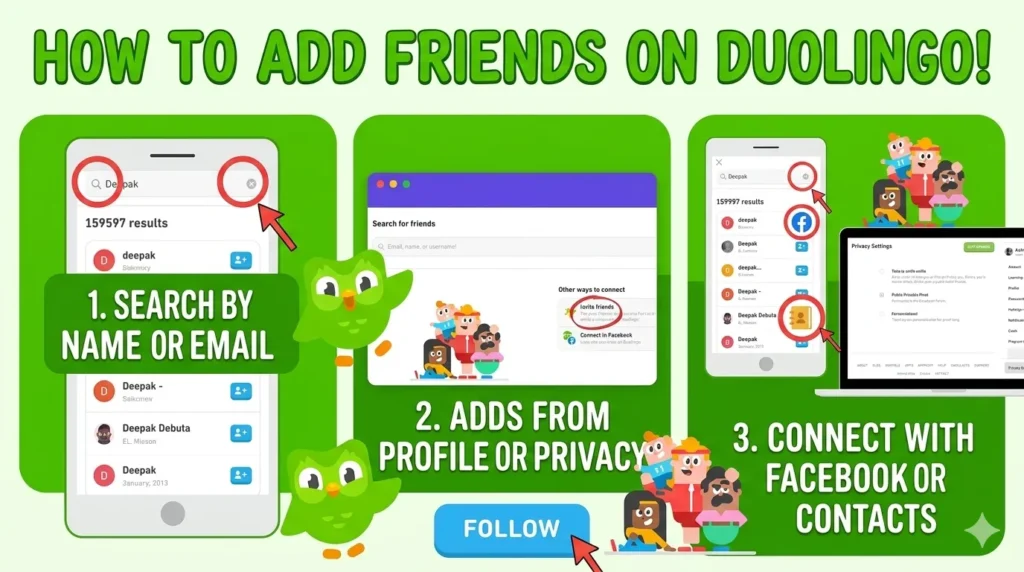
- Launch the Duolingo app on your iOS or Android device.
- Tap the Profile icon located in the bottom navigation bar.
- Look for the Add Friends button—usually prominently displayed in your profile section.
- Choose from your options: search by username/email, sync your contacts, or connect to Facebook to find people you already know.
- Tap the Follow or Add button next to the desired user to send your request.
On Desktop
- Log in to your account at duolingo.com.
- Click on your profile picture or username in the top-right corner to open the menu.
- Navigate to your Profile page or look for the Friends tab.
- Click the Find Friends button to open the search interface.
- Enter the username or email of your friend, then click the Follow button to connect.
Why You Can’t Add Friends On Duolingo
Even with a perfect setup, technical hurdles can occasionally prevent you from adding friends.
- Button Missing: This often happens if you are part of a “Duolingo for Schools” classroom, which restricts social features.
- Username Not Working: Ensure you are entering the exact username or registered email; even a minor typo will result in no search results.
- Privacy Issues: If a user has set their profile to Private in their settings, they may be hidden from search results entirely.
- App Version Problem: Using an outdated version of the app can cause sync errors, preventing the interface from loading correctly.
Fix: Duolingo Add Friend Not Working
If you are stuck, try these practical fixes to restore your social functionality.
- Verify Your Email: Go to your Account Settings and ensure your email address is verified; this is a common requirement for social features.
- Clear App Cache: On Android, navigate to Settings > Apps > Duolingo > Storage > Clear Cache to wipe out temporary glitches.
- Toggle Privacy Settings: Ensure your profile is set to Public so that others can find and follow you back.
- Update the App: Visit your device’s app store to ensure you are running the latest version of Duolingo.
- Log Out and Re-login: Sometimes, a simple refresh of your session is all it takes to resolve server-side sync issues.
How To Find Friends Easily
Finding the right people to compete with can transform your study habits.
- Username Search: If you know your friend’s exact Duolingo username, this is the most accurate way to find them.
- Profile Link Method: You can share your unique profile URL via WhatsApp, text, or email, allowing friends to click and follow you directly.
- Contact Sync: Allow the app access to your phone contacts to automatically populate a list of friends who are already using Duolingo.
Follow vs Friend On Duolingo (Explained)
On Duolingo, the system is technically a “Follow” model rather than a traditional bidirectional “Friend” request. When you follow someone, you see their progress and activity in your feed, but they must follow you back for you to appear as “friends” in each other’s lists. This asymmetric system allows you to follow mentors or top learners without needing their explicit approval for every interaction.
Benefits Of Adding Friends On Duolingo
Adding friends provides more than just a social connection; it provides a measurable boost to your learning consistency.
| Feature | Benefit |
| Leaderboards | Adds competitive tension to stay in the top spots. |
| Friend Quests | Weekly challenges that require collaboration to earn rewards. |
| Motivation | Seeing friends’ progress keeps you accountable for your daily streak. |
| Tracking | Easily monitor the language-learning milestones of those you follow. |
FAQs
Why can’t I find my friend?
They might have a Private Profile or be part of a restricted school account.
Can I add without a username?
Yes, you can sync your contacts or connect via Facebook.
How do I send someone a friend request on Duolingo?
Simply find their profile and click the Follow button.
How to look up friends on Duolingo?
Use the Search bar within the “Add Friends” section of the app.
How do I add friends on Duolingo?
Navigate to your Profile, tap Add Friends, and use the search or invite options.
Does Duolingo have friends?
Yes, it uses a follower-based system that functions similarly to social media platforms.
How do I find friends on Duolingo?
You can use the Find Friends button, sync your contacts, or share your profile link.
Why should you add friends on Duolingo?
It increases motivation, enables Friend Quests, and makes learning a communal experience.
How do I add friends on Duolingo 2026?
The method remains the same: go to your Profile, select Add Friends, and choose your preferred search method.
How can someone find me on Duolingo?
Share your username or profile link with them so they can search for you directly.
Is there a friend request system?
It is a Follow system where you can follow others; they can then follow you back to establish a mutual connection.
Conclusion
Connecting with others on Duolingo is one of the most effective ways to stay committed to your language-learning goals. By following these steps to manage your friends list and troubleshooting common issues, you can ensure your social experience is seamless.
Remember, the goal is to build a supportive community that pushes you to maintain your streak and achieve fluency faster than you could alone. Start adding friends today and turn your solitary lessons into a collaborative language-learning adventure.

I’m a website professional with 5 years of experience in building, managing, and growing online content platforms. As the creator of DuolingoGuides.us, I focus on providing helpful, easy-to-understand guides and resources for Duolingo users and language learners. My goal is to make information simple, accurate, and accessible for everyone.