How To Share Your Duolingo Progress Easily: Step-by-Step Guide
Sharing your language-learning journey can boost motivation, but many users struggle to showcase their progress effectively. This guide provides a clear and practical approach to sharing achievements, streaks, and milestones on Duolingo.
Whether you’re using a mobile device or desktop, you’ll learn where to find share options, how to post on social platforms, and what to do when features are missing, ensuring your progress is easy to display and celebrate.
Can You Share Duolingo Progress?
Yes, you can share Duolingo progress, but the exact option depends on what you want to share and which screen you are using. In most cases, users share streaks, achievements, badges, or lesson results rather than a full private progress dashboard. Duolingo also syncs progress through your account, so the same learning data appears across devices when you log in with the same account.
- Progress updates.
- Streaks.
- Achievements.
- Leaderboard results.
- Language learning milestones.
That distinction matters because Duolingo does not always place one single “share progress” button in every part of the app.
How To Share Duolingo Progress
On Mobile iPhone & Android
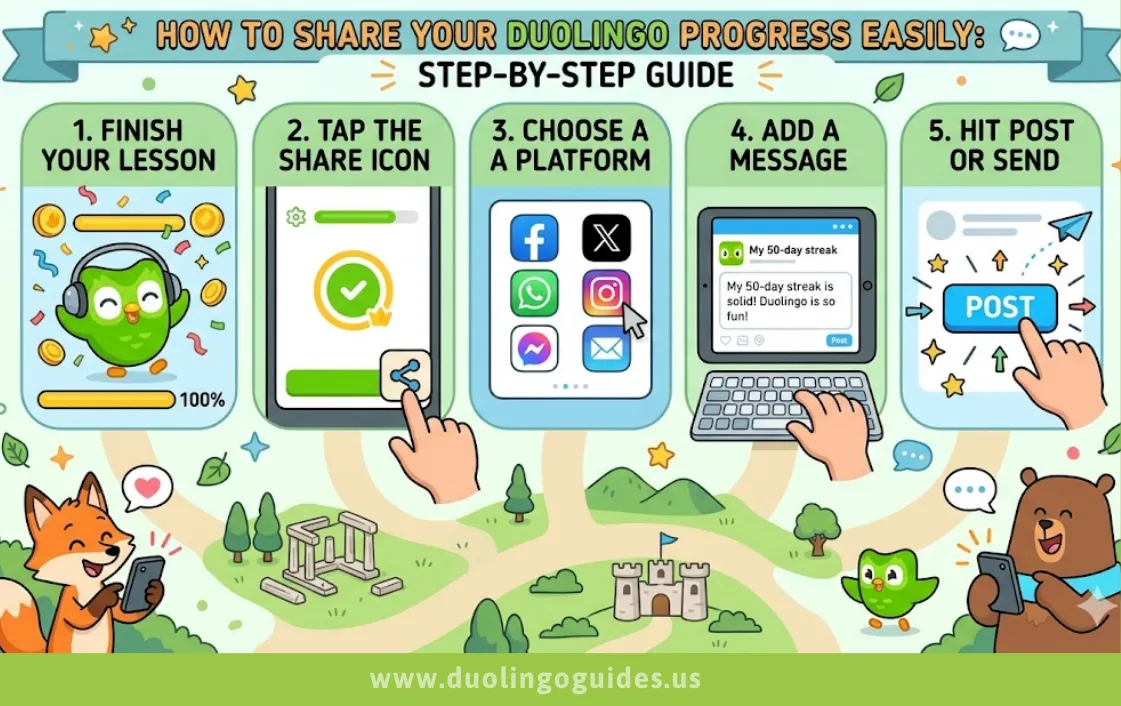
On mobile, the most common path is through your profile, achievements, or streak-related screens. A tutorial walkthrough shows users opening the app, tapping the profile/avatar area, scrolling to the achievements section, selecting an item, and then using the share icon at the top right. Another example shows tapping the streak/calendar area and then choosing a share option to send it through apps like WhatsApp.
Use this simple process:
- Open the Duolingo app.
- Go to your profile or avatar area.
- Tap achievements, streak, or progress-related content.
- Open the item you want to share.
- Tap the share icon.
- Choose Instagram, Facebook, WhatsApp, or another app if available.
If the app shows a direct share sheet, that is usually the fastest way to post your progress.
On Desktop
On desktop, sharing options are often more limited than on mobile. Duolingo’s shared data is still account-based, but the easiest public-sharing actions usually happen in the app rather than in a browser session. If you are on desktop and do not see a share button, try checking your profile, achievements, or league-related areas first.
A practical desktop workflow is:
- Sign in to the same account you use on mobile.
- Check your profile and achievement pages.
- Look for any export or share icon.
- If none appears, use a screenshot or copy your profile link as a workaround.
That approach is especially useful for users who manage Duolingo from a laptop during work or study sessions.
Also Check: Duolingo Duels Explained
Why You Can’t Share Duolingo Progress
Privacy settings are one of the most common reasons sharing feels blocked. If your profile or social features are limited, you may not see the same share tools other users see. Since Duolingo’s progress and streak data sync through your account, the issue is usually about display or sharing access, not lost progress.
Other common problems include:
- No share button on that screen.
- App version is outdated.
- The progress item is not shareable.
- A temporary app glitch hides the share option.
If your progress is not showing correctly across devices, that can also make sharing feel broken; users have reported syncing issues between devices in community discussions. In that case, signing out and back in, updating the app, or checking the same account on all devices usually helps.
How To Share Achievements & Streak
Duolingo achievements are one of the easiest things to share because they are designed as motivational milestones. Public guides mention achievements such as longest streak, perfect lessons, most XP, and highest league, which makes them useful proof of consistency. Streak sharing is even more popular because it gives people a quick visual sign of commitment.
Here’s what usually works best:
- Badges: Share milestone badges from the achievements section.
- Streak: Share your daily or long-term streak from the streak screen.
- Leaderboard: Share your league placement if it is available in your app.
This type of content performs well on social platforms because it is short, visual, and easy to understand. A 2000-day streak is definitely impressive and can be used as strong social proof, especially for language learning audiences.
How To Share Duolingo Progress On Social Media
For Instagram, Facebook, and Twitter/X, the easiest method is usually the in-app share menu. A Duolingo walkthrough shows that after opening an achievement or progress item, users can tap the share icon and then send it through Instagram, Facebook, WhatsApp, or similar apps. Another tutorial also shows choosing a direct messaging app after tapping the share icon from the streak screen.
Recommended platform strategy:
- Instagram: Share a streak screenshot or achievement card in Stories.
- Facebook: Post your milestone to friends or language-learning groups.
- Twitter/X: Share a short progress update with your streak number and goal.
Keep the caption simple and goal-driven. For example, “Day 75 of learning Spanish with Duolingo” is clearer and more engaging than a long paragraph.
Best Workarounds
When the share option is missing, the fastest workaround is a screenshot. Capture the streak, achievement, or profile section, then crop the image so only the useful part is visible. This works well for social posts, chats, and story uploads.
The second workaround is the profile link method. If your profile is visible and connected to friends, sharing the profile link can be a clean way to show your learning activity. Since Duolingo data syncs through your account, your profile becomes a stable reference point across devices.
Useful fallback options:
- Screenshot method.
- Profile link method.
- Copy your streak number into a post.
- Share a leaderboard result manually.
These workarounds are especially helpful when the app layout changes or the share button is temporarily unavailable.
Pro Tips
Make your profile as visible as possible if you want more interaction. Duolingo’s social and account syncing system works best when you are using the same account consistently across devices. Adding friends can also make your activity feel more social, which can increase motivation and accountability.
Use your streak as social proof when sharing. A streak shows consistency, and consistency is often more persuasive than a one-time test score. For learners, that makes streak posts more powerful than plain “I studied today” updates.
To improve engagement:
- Make your profile public if the setting is available.
- Add friends and follow active learners.
- Share streak milestones, not every single day.
- Pair your post with a short learning goal.
FAQs
Can others see my Duolingo progress?
Yes, but usually only the parts you share or the parts visible through your profile and social features. Duolingo progress is stored on your account and synced across devices.
Is Duolingo profile public?
It can be visible depending on your privacy and social settings. If your profile appears limited, check whether your account is set up for social sharing.
How do I share my progress on Duolingo?
Open your profile, achievements, or streak screen, tap the item you want to share, and use the share icon if it appears.
Is a 2000 day Duolingo streak good?
Yes. A 2000-day streak is an exceptional consistency signal and strong social proof for language learning.
How do I interact with my friends on Duolingo?
Use friend features, compare streaks or league progress, and share achievements or milestones that keep the interaction active.
How to use Duolingo more seriously to learn a language?
Set a daily goal, track streaks, review mistakes, and treat achievements as motivation instead of the finish line.
What is a Duolingo classroom?
It is a structured learning setup often used for teachers, groups, or organized learning environments.
How do I share my Duolingo family plan?
The family plan is managed through the account or subscription settings, and sharing access usually means inviting people through the plan management screen rather than posting it publicly.
How do I share my Duolingo results?
Use the share icon on a lesson result, achievement, or streak screen if available, or take a screenshot as a backup.
How to share Duolingo with someone?
You can share your profile, streak image, achievement badge, or invitation link depending on what Duolingo exposes in your app.
Why is my progress not showing?
This can happen because of syncing delays, account mismatches, or app issues; users have reported progress not syncing well across devices.
Conclusion
Sharing Duolingo progress is easy once you know where to look: achievements, streaks, profile screens, and share icons are the main paths. If the share button is missing, screenshots and profile links still give you a clean way to show progress, while account syncing keeps your learning data consistent across devices.

I’m a website professional with 5 years of experience in building, managing, and growing online content platforms. As the creator of DuolingoGuides.us, I focus on providing helpful, easy-to-understand guides and resources for Duolingo users and language learners. My goal is to make information simple, accurate, and accessible for everyone.