How to Fix Too Many Requests on Duolingo Fast Working
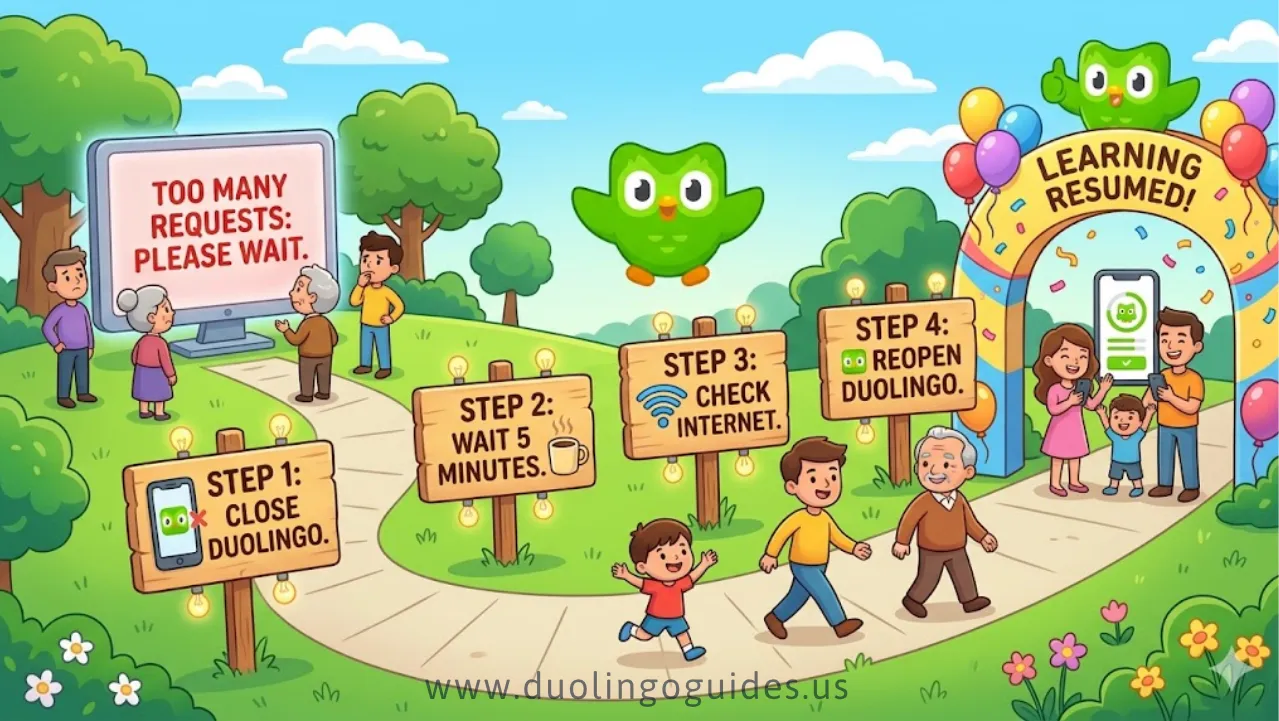
Duolingo showing Too Many Requests usually means you hit a rate limit, not that your account is banned. In most cases, the fix is quick: switch networks, close the app, wait a few minutes, and try again.
If Duolingo suddenly stops working and shows “Too Many Requests,” don’t panic. This error is commonly tied to too many actions in a short time, network traffic, or temporary server limits rather than a permanent account problem
For users in the USA, the fastest fixes usually involve switching from Wi‑Fi to mobile data, turning off VPNs, and reopening the app after a short wait. Those steps match the most common workaround pattern reported for request-limit errors.
Why It Happens
“Too Many Requests” usually appears when an app receives too many actions too quickly. On Duolingo, that can happen after repeated refreshes, many lesson attempts, multiple sign-ins, or heavy traffic from a shared network.
VPNs, school networks, and workplace internet can also trigger the issue because they route lots of users through the same IP address. In those cases, Duolingo may limit requests to protect service stability.
Also Check: The Ultimate Duolingo Guide
Device Fixes
For iPhone users, the practical fix is usually to reinstall the app, since iOS does not offer a traditional in-app cache clear in the same way Android does. Updating iOS and disabling VPNs can also help reduce repeated request errors.
For Android users, clear the app’s data and cache, then force stop Duolingo before reopening it. Keeping the app updated and closing background apps can also improve stability.
Network Fixes
Network changes matter a lot in the USA because many users switch between home Wi‑Fi, office internet, school Wi‑Fi, and mobile data all day. If Duolingo errors out, try switching from Wi‑Fi to LTE or 5G, then restart the router if you are on home
Avoid school or work VPNs while using Duolingo because shared or filtered networks can create repeated request patterns that trigger rate limits. If you must use a VPN, turn it off temporarily and test the app again.
How Long It Lasts
In many cases, the error clears in about 5–30 minutes once the request load drops. Some users also report longer lockouts when they have triggered repeated limits, and browser-based use has been described as less restricted in some cases.
A rare lockout can last up to 24 hours, especially after repeated fast retries or lots of activity in a short period. The safest approach is to stop refreshing and let the limit expire naturally.
Internet Connection Fix for Duolingo Access Best Guide
| Issue Area | Simple Action | Why It Helps |
|---|---|---|
| Wi-Fi Stability | Check that your Wi-Fi signal is steady and your network is working properly. | A stable connection prevents sudden drops and slow speeds. |
| Router Reset | Turn your router off, wait about 30 seconds, then turn it back on. | Restarting clears temporary errors and refreshes the connection. |
| Network Congestion | Disconnect unused devices or switch to a different Wi-Fi band (like 5 GHz). | Fewer connected devices reduce traffic and improve speed. |
| Mobile Data Performance | Make sure your signal is strong and restart your phone if needed. | Refreshing your device can fix minor data connection issues. |
App Maintenance to Reduce Error Frequency Guide
| Topic | What It Means | Quick Steps | Why It Helps |
|---|---|---|---|
| Cache & Data Management | Temporary files can build up over time and cause glitches or errors. | Clear old cache or manage stored data regularly. | Removes corrupted files and improves app performance. |
| Android Users | Android devices allow you to clear cache without deleting personal data. | Go to Settings → Apps → Duolingo → Clear Cache. | Fixes common loading or request errors without resetting progress. |
| iOS Users | iPhones don’t have a direct cache clear option, but you can offload the app. | Go to Settings → General → iPhone Storage → Duolingo → Offload App. | Frees up space and refreshes the app while keeping your learning data safe. |
| App Updates | Running an outdated version can cause compatibility issues. | Check the app store and install the latest version regularly. | Updates include bug fixes, security improvements, and smoother performance. |
Common Mistakes
These mistakes usually make the error worse:
- Reinstalling the app over and over.
- Logging in from many devices at once.
- Refreshing too fast after the error appears.
- Keeping VPNs, proxies, or school filters active.
FAQ
Is Duolingo banned if I see this error?
No. This error usually points to rate limiting or temporary traffic control, not a ban.
Will my streak be lost?
Usually no, because this is normally a temporary app or network issue rather than an account closure.
Does VPN cause this issue?
Yes, it can. VPNs and shared networks can contribute to repeated request limits.
How do I fix Too Many Requests on Duolingo?
Switch to mobile data, close the app, wait a few minutes, disable VPNs, and reopen Duolingo.
Is there a “Too Many Requests” error on Duolingo?
Yes. Users report both app and website versions showing request-limit style errors.
How to get rid of bulk friend requests on Duolingo?
That is a separate account-management issue, and the safest move is to review your social settings and limit unwanted interactions. I did not find a reliable source in the gathered results confirming a single universal fix.
Why is Duolingo causing errors?
Common causes include too many rapid actions, server-side rate limiting, multiple device logins, or network filtering.
What is a rate limiting error on Duolingo?
It means Duolingo is temporarily restricting repeated requests from your device or network to prevent overload.
Is there something wrong with Duolingo right now?
Sometimes there can be service issues, and outage trackers monitor current problems for US users.
How many attempts are there in Duolingo?
That depends on the lesson, mode, and app system; the gathered sources mainly describe request limits rather than a fixed attempt cap.
Is a 2000 day Duolingo streak good?
Yes, that is an impressive streak by any normal standard, but it is unrelated to the request-limit error.
How to prevent it in future?
Use one device at a time, avoid fast repeated refreshes, keep the app updated, and stay off VPNs when possible.
Conclusion about Duolingo
Duolingo “Too Many Requests” is usually a temporary rate-limit problem, not a serious account issue. The fastest fix for USA users is to switch to mobile data, close the app, wait a few minutes, and try again without VPNs or repeated refreshes.
Special word: Rate limit is the key idea here, because the app is usually protecting itself from too many repeated requests rather than punishing your account.

I’m a website professional with 5 years of experience in building, managing, and growing online content platforms. As the creator of DuolingoGuides.us, I focus on providing helpful, easy-to-understand guides and resources for Duolingo users and language learners. My goal is to make information simple, accurate, and accessible for everyone.