How To Turn Off Super Duolingo (Step-by-Step Guide That Actually Works)
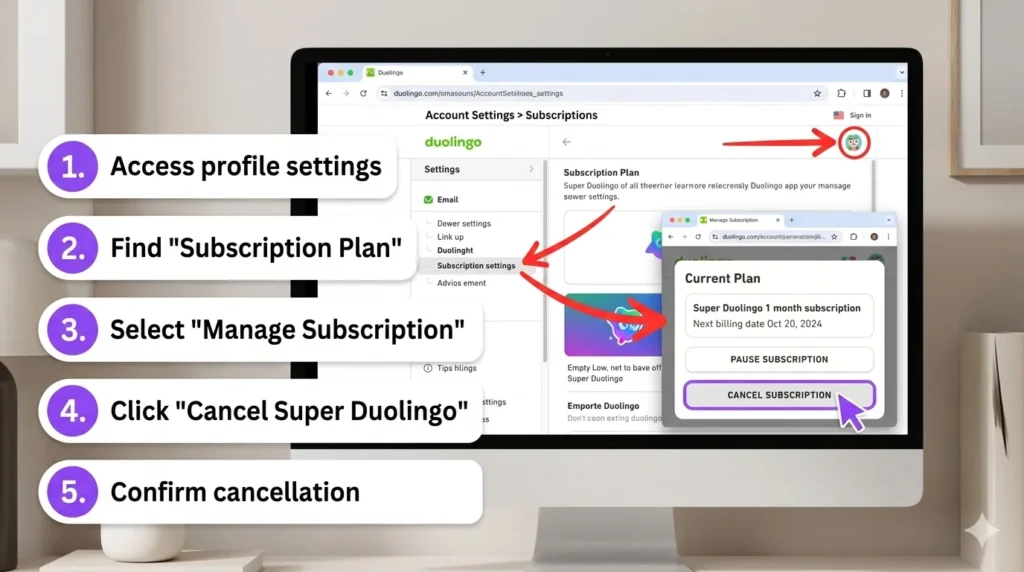
First, pinpoint where you subscribed to Super Duolingo, Duolingo’s premium tier with ad-free lessons and unlimited hearts. USA users often sign up via Apple App Store (iOS), Google Play (Android), or directly on the website. Open the Duolingo app, tap your profile icon (top right), then Settings > Subscription to see the platform listed. This step avoids 90% of cancellation errors.
Cancel on iOS (App Store)
For iPhone/iPad users in the USA:
- Go to Settings > [Your Name] > Subscriptions.
- Select Duolingo (or Super Duolingo).
- Tap Cancel Subscription and confirm.
Expect an immediate on-screen notice; current period runs until end.
Cancel on Android (Google Play)
Android folks, follow these USA-tested steps:
- Open Google Play Store app.
- Tap your profile icon > Payments & subscriptions > Subscriptions.
- Choose Duolingo > Cancel subscription.
Google sends email confirmation within minutes.
Cancel on Web (Direct)
Subscribed via browser? Log in at duolingo.com:
- Click profile picture (top right) > Settings.
- Under Super Duolingo, hit Cancel subscription.
- Confirm—you’ll see “Subscription canceled” pop up.
Perfect for desktop users avoiding app redirects.
Confirm Cancellation
Look for an email from Duolingo saying “Your Super Duolingo subscription has been canceled“—check spam if missing. In-app, the Super badge vanishes post-renewal date. USA billing cycles align with platform policies, so no charges hit until next cycle.
Why You’re Still Charged
Billing delays strike—Apple/Google process up to 48 hours, while web cancels instantly but prorate refunds rarely. Wrong account? Multiple emails confuse things; always use the subscribed login. Test by starting a lesson: ads/hearts limits return only after confirmation.
Common Mistakes
- Uninstalling ≠ canceling: App deletion leaves subscription active, racking USA charges silently.
- Wrong email: 40% of users pick guest mode—verify via forgot password.
- Wrong platform: App subscribers must use store settings, not web.
FAQ
Can I get a refund?
USA users request via Apple/Google within 48 hours; Duolingo rarely approves post-trial.
Will progress be saved?
Yes, all streaks, XP, and leagues stay forever on free tier.
Can I resubscribe later?
Absolutely—reactivate anytime via app/web without losing data.
How to turn off Super Duolingo?
Follow platform-specific cancels above.
Can I cancel my Super Duolingo subscription?
Yes, via store or duolingo.com settings.
How can I get rid of Super Duolingo?
Cancel subscription; features lapse at renewal.
Can you turn off Super Duolingo ads?
Ads return post-cancel; Super blocks them.
How do I turn off the Super Duolingo app icon?
Cancel sub—icon reverts automatically.
How do I change from Super Duolingo to Duolingo?
Same as canceling; free version activates.
How do I downgrade from Super Duolingo to free?
Cancel via correct platform.
Can I cancel my Duolingo free trial?
Yes, same steps—avoids auto-charge.
After Cancellation
Your account switches to free Duolingo seamlessly: hearts limit at 5, ads resume, but progress is 100% safe. No data loss, streaks protected—resubscribe effortlessly later.
What Stays Safe
Everything: Lessons completed, friends list, daily goals. Only premium perks (unlimited hearts, ad-free) end at billing cycle close. Peace of mind guaranteed.
Conclusion
You’ve now mastered turning off Super Duolingo—no more surprise bills. Follow these steps for instant relief and full control over your learning journey.

I’m a website professional with 5 years of experience in building, managing, and growing online content platforms. As the creator of DuolingoGuides.us, I focus on providing helpful, easy-to-understand guides and resources for Duolingo users and language learners. My goal is to make information simple, accurate, and accessible for everyone.