How to Cancel Duolingo Plus in 2026 (Without Getting Charged Again)
Stop Unexpected Charges Now
It is frustrating to see a subscription charge on your bank statement when you thought you had already canceled your account. Whether you signed up for a free trial that rolled over into a paid plan or you simply decided to take a break from your language-learning journey, unexpected charges are a common pain point for users.
This guide provides a quick fix to ensure you stop future payments immediately, covering every device—iPhone, Android, and Desktop—so you can regain control of your finances.
Quick Answer: How to Cancel
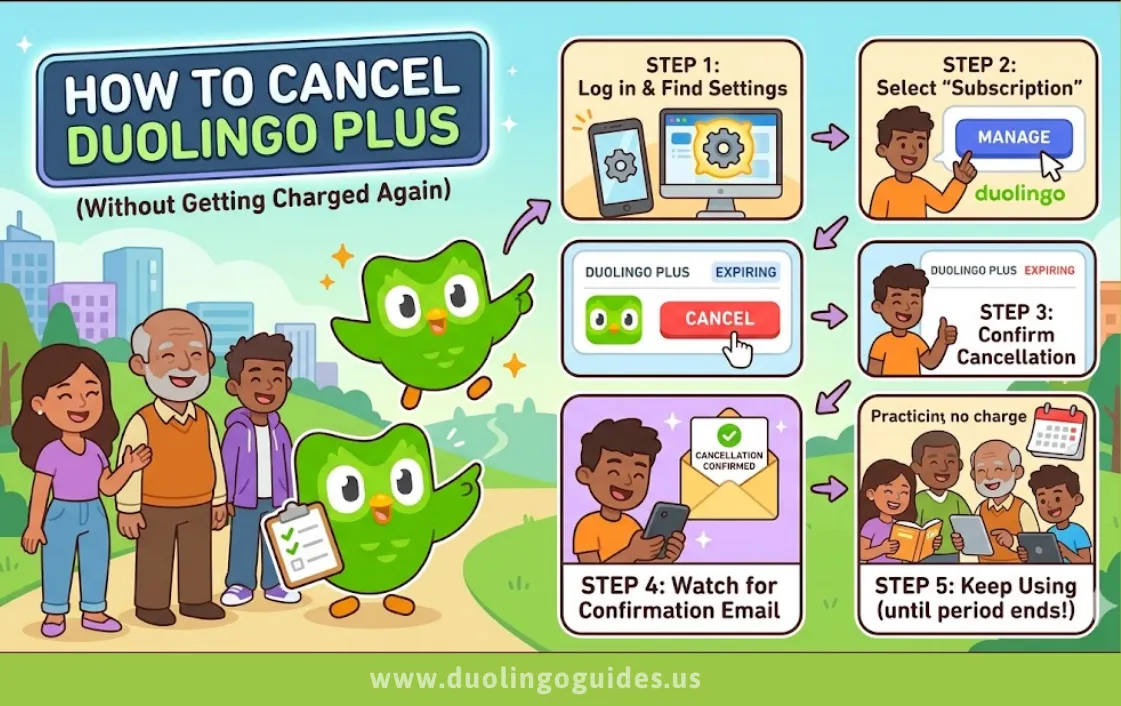
If you are in a rush, here is the fastest way to stop your subscription based on where you signed up:
- iPhone: Go to Settings > [Your Name] > Subscriptions > Select Duolingo > Cancel Subscription.
- Android: Open Google Play Store > Profile Icon > Payments & Subscriptions > Subscriptions > Select Duolingo > Cancel Subscription.
- Web: Log in to Duolingo > Settings > Super Duolingo > Manage Subscription > Cancel.
Cancel on iPhone (Apple Users)
Many users face Apple billing confusion because subscriptions are managed through the Apple ID, not the app itself. Follow these steps to ensure you successfully terminate your plan:
- Open your Settings app on your iPhone or iPad.
- Tap on your Name/Apple ID at the very top of the screen.
- Tap on the Subscriptions menu.
- Find Duolingo (often listed as “Super Duolingo”) in the list of active subscriptions.
- Tap Cancel Subscription at the bottom. If you do not see this button, it may already be canceled or was not purchased through Apple.
Also Check: Is Duolingo Good for Kids? Honest Parent Review
Cancel on Android (Google Play)
For Android users, the process is streamlined through the Google Play Store.
- Launch the Google Play Store app.
- Tap your Profile icon located in the top right corner.
- Select Payments & subscriptions, then tap on Subscriptions.
- Tap on Duolingo from your active list.
- Tap Cancel subscription and follow the prompts to confirm your decision.
Cancel on Desktop (Website)
If you signed up directly via the Duolingo website, you must manage your billing through their portal.
- Log in to your account at
- Click on your profile icon and select Settings.
- Navigate to the Super Duolingo tab on the right-hand sidebar.
- Select Manage Subscription and click Cancel Plan.
- Follow the on-screen prompts—Duolingo may ask for a reason for leaving; select your preference to proceed to cancel.
Why You’re Still Being Charged
If you believe you canceled but are still seeing charges, it is usually due to one of these common mistakes:
- The Trial Ended: If you do not cancel at least 24 hours before a trial ends, most app stores process the payment automatically.
- Wrong Account: You might have signed up on a different email address or Apple ID/Google account than the one you are currently checking.
- Failed Cancellation: You may have stopped the process halfway without clicking the final “Confirm” or “Proceed to Cancel” button.
How to Confirm Cancellation
Do not assume it is done until you verify the status. First, check your email inbox for a cancellation confirmation message from Apple, Google, or Duolingo. Second, revisit your device’s subscription settings; the status should change to “Expires on [Date]” rather than “Renewing on [Date]”.
Alternatives to Duolingo Plus
| Option | Description |
|---|---|
| Free Duolingo Version | The basic version of Duolingo provides interactive lessons and practice exercises, making it a useful starting point for learning a new language even without premium features. |
| Alternative Learning Apps | Platforms like Babbel, Rosetta Stone, and Memrise offer different teaching styles and tools, allowing learners to choose what fits their preferences best. |
| In-Person Language Classes | Joining classes at community colleges, language institutes, or with private tutors offers a structured and immersive learning environment. |
| Language Exchange Programs | Engaging with native speakers through exchange programs helps improve speaking skills while building cultural connections. |
Also Check: Is Super Duolingo Free
Refund Policy Explained
Refund policies are dictated by the platform where you made the purchase, not Duolingo itself. Apple (iOS) and Google (Android) generally handle their own billing, and they are often strict about refund expectations. If you were charged incorrectly, contact the respective app store support directly for a refund request, or reach out to Duolingo support if you subscribed via their website.
Troubleshooting (BIG WIN)
If the cancel button is missing, it usually means the subscription is already inactive, or you are signed into the wrong account. If you are still charged after following these steps, contact your bank to dispute the transaction while simultaneously emailing Duolingo customer support with screenshots of your subscription status and any confirmation emails.
FAQs
Can I cancel anytime?
Yes, you can cancel whenever you want, and you will retain access to premium features until the end of your current billing cycle.
Will I lose progress?
No, canceling only removes premium features; your language progress, streak, and XP remain fully intact.
Can I cancel my Duolingo free trial?
Yes, you can cancel immediately after signing up to ensure you aren’t charged when the trial ends.
Can I get a refund if I cancel Duolingo Plus?
Refunds depend on the platform’s terms; contact Apple or Google support to request one.
How to cancel Super Duolingo on Android?
Use the Google Play Store subscription management path described in Section 2.
How to cancel Duolingo “owl” phone?
This refers to the mobile app; follow the iPhone or Android steps above depending on your device.
Can I restart later?
Absolutely, you can re-subscribe to Super Duolingo at any time via the app or website.
Conclusion
Successfully managing your digital subscriptions is essential for avoiding unwanted financial charges. By following these specific steps for your device, you ensure that your Duolingo Plus subscription is terminated effectively and permanently.
Always verify your cancellation status through your account settings to guarantee you are no longer enrolled in a paid plan. Enjoy your continued, free language learning journey with the peace of mind that your account is fully managed.

I’m a website professional with 5 years of experience in building, managing, and growing online content platforms. As the creator of DuolingoGuides.us, I focus on providing helpful, easy-to-understand guides and resources for Duolingo users and language learners. My goal is to make information simple, accurate, and accessible for everyone.